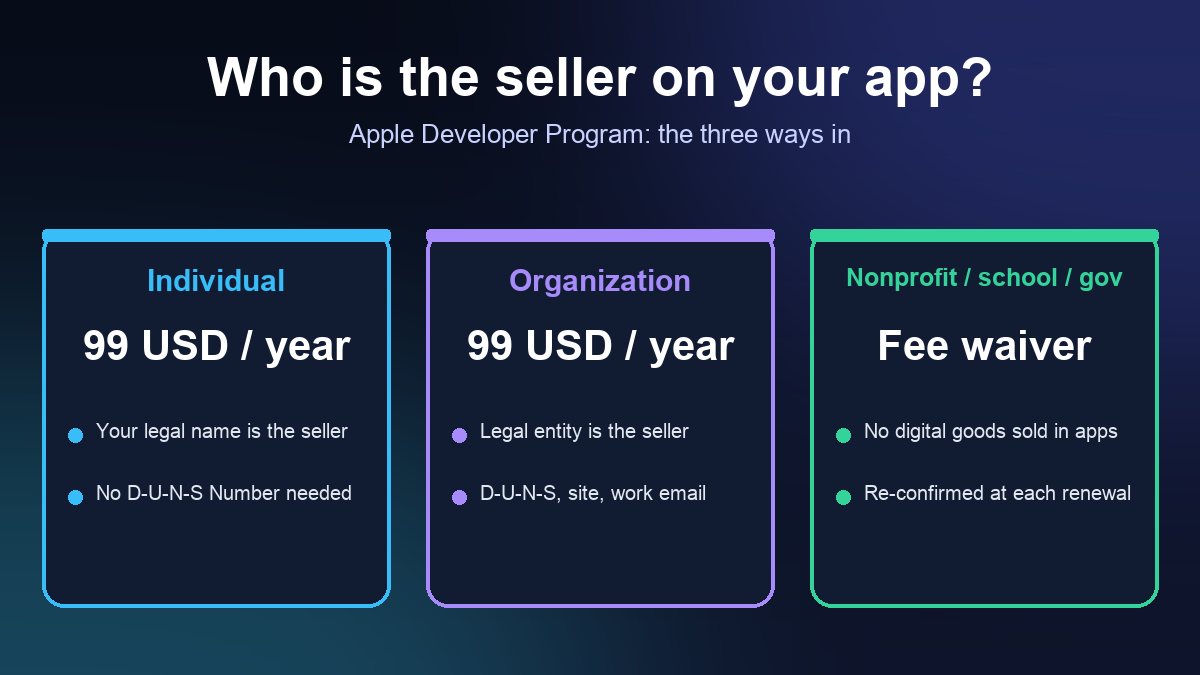
Short answer: The Apple Developer Program costs 99 USD per membership year, whether you enroll as an individual or as an organization. An organization also needs a D-U-N-S Number, a public website and a work email on its own domain, and the person enrolling must have the legal authority to sign for it. A nonprofit, accredited school or government entity can request a fee waiver, but only if it does not sell digital goods or services through its apps. If you are a small business, the realistic cost is the 99 USD plus a few weeks of paperwork, so start the D-U-N-S step first.
This guide is for owners who are about to hire an app builder or publish a no-code app and need to decide whose name goes on the App Store. It is a summary of Apple's own pages, checked on 31 October 2026, not legal or tax advice. Apple can change fees and rules, so confirm the details on the enrollment page before you pay.
What the fee is, and what it is not
Apple's enrollment help says the Apple Developer Program annual fee is 99 USD, shown in local currency where available. The Apple Developer Enterprise Program, which is for distributing apps inside a company and not on the public App Store, is 299 USD a year and needs its own separate verification. Most small businesses want the 99 USD program.
That fee is the membership, not the cost of building the app. It does not include development, design, hosting or any in-app purchase commission. For those, see our guide to what it costs to build an app and our breakdown of App Store and Google Play fees. Google Play charges a one-time registration fee instead of an annual one, and that comparison is covered in the fees guide.
Individual or organization: who is the seller?
The enrollment type decides the name customers see as the seller on your App Store page.
- Individual or sole proprietor. Your personal legal name is listed as the seller. Apple says not to enter an alias, nickname or company name in the first and last name fields, because a mismatch delays approval.
- Organization. The legal entity name is listed as the seller, for example "ABC Company, Inc." Apple counts companies, nonprofits, joint ventures, partnerships and government organizations in this group.
For a restaurant, salon, gym or agency with customers, the organization route usually looks more trustworthy and keeps the app tied to the business instead of one person. It also lets you add team members later. The trade-off is more verification. If you are a sole proprietor or single-person business, Apple says to enroll as an individual, and you do not need a D-U-N-S Number.
What an organization needs before applying
Apple's enrollment page lists the requirements. Gather these before you start, because a missing item is the usual reason for delay:
- A legal entity. Apple does not accept DBAs, fictitious business names, trade names or branches. If you trade as "Main Street Pizza" but the legal entity is "MSP Holdings LLC", enroll as the LLC.
- A D-U-N-S Number. This is a unique nine-digit business identifier from Dun & Bradstreet that Apple uses to check your identity, legal status and address. Government organizations are exempt.
- Legal binding authority. You must be the owner or founder, an executive team member, a senior project lead, or an employee with authority granted by a senior employee. If you are not the owner or founder, Apple asks for a reference who can confirm that authority.
- A work email on your domain. A free webmail address does not match an organization's domain.
- A working public website on that same domain. Apple says a social media page, a nearly empty site or a registrar parking page will not be accepted.
You may also be asked for business documents, and Apple says some may need to be notarized to certify they are true copies. Whoever enrolls becomes the Account Holder, which matters later: only the Account Holder can renew an organization's membership, so do not let an agency or freelancer hold that role. Apple has a separate guide for how to transfer the Account Holder role if staff change.
Getting a D-U-N-S Number without paying for it
Apple says a D-U-N-S Number is free in most jurisdictions. Dun & Bradstreet may already have assigned one to your business, so use Apple's D-U-N-S lookup first. You will be asked for your legal entity name, headquarters address, mailing address and work contact details. If your company is not listed, you can submit it to Dun & Bradstreet for a free number.
Apple's timing guidance is specific:
- Allow up to 5 business days to receive the number from Dun & Bradstreet, and Apple says paying to expedite does not shorten that wait.
- If your application takes longer than two weeks, Apple suggests emailing D&B.
- After you receive the number, allow up to 2 business days for Apple to receive it before you enroll.
A common failure is the message "Your organization is not listed as a legal entity." Apple says this means the business is recorded in D&B with a different legal status, such as a sole proprietorship, or its status has not been verified. The fix is to use the exact legal entity name, or to send D&B your registration documents. If you really are a sole proprietor, enroll as an individual instead.
Who qualifies for the fee waiver
Apple lets a nonprofit organization, accredited educational institution or government entity request a fee waiver. Per Apple's fee waiver page, you must:
- be a legal entity with nonprofit, accredited education or government status, and not an individual, sole proprietor or single-person business;
- not have signed the Paid Applications Agreement for paid apps or in-app purchases (or have terminated it); and
- not otherwise sell digital goods or services through any of your apps.
Apple's footnote says a nonprofit must be officially recognized by a relevant authority in its region, and gives the Internal Revenue Service in the United States as the example. An accredited school must be recognized by an official accrediting body, such as the Department of Education in the U.S.
To use it, select the fee waiver option during enrollment. If your organization is already a member, the Account Holder can submit a request at any time before the membership expires. Apple reviews it and may ask for documents. Three details catch people out:
- No refunds. Apple says full or partial refunds are not available for a membership you already paid, so request the waiver before you pay.
- Annual re-confirmation. At each renewal the Account Holder must confirm the organization is still eligible.
- It can be removed. If you stop meeting the requirements, you become responsible for the 99 USD fee.
Fundraising apps: a different rule from the fee
Many nonprofit owners assume the waiver also lets them take donations in the app. It does not. Apple's App Review Guidelines (section 3.2.1) say approved nonprofits may fundraise directly within their own apps if the campaigns follow all guidelines and offer Apple Pay, disclose how funds will be used, follow local and federal law, and make tax receipts available to donors. Section 3.2.2 says that unless you are an approved nonprofit, collecting funds for charities in the app is not allowed, and such apps must be free and collect money outside the app, for example through Safari or SMS. Apple has a separate application for the approved nonprofit status through Apple Pay for nonprofits.
Event ticketing, paid memberships or merchandise sold as digital goods in your app can also affect whether you still qualify for the waiver, because of the rule against selling digital goods. If your nonprofit plans to run events or sell tickets, read our guide to event management software for nonprofits and check the waiver conditions with Apple before building a payment flow.
Renewal: keep the account alive
Membership is annual. If you enrolled on the web, Apple says you can turn on Auto-renew in Membership details (available only in some regions) or renew manually starting 30 days before expiry. If you enrolled through the Apple Developer app, the membership is an auto-renewable subscription that charges the default payment method on that Apple Account until you cancel. For organizations, the Account Holder must do the renewing. If a membership lapses, Apple says free apps you had available return within 24 hours of renewing, and paid apps return after you accept the Paid Applications Agreement in App Store Connect. You do not need to resubmit your apps.
A practical order of work
- Decide the seller name: your own legal name or the legal entity.
- For an organization, look up the D-U-N-S Number today. If none exists, request it and plan for roughly a week.
- Make sure the website and a domain email are live and match the legal entity.
- Pick who will be Account Holder, ideally an owner or executive, not an outside developer.
- If you are a nonprofit, school or government entity that sells no digital goods, choose the fee waiver at enrollment.
- Enroll, wait for Apple's verification email, then pay (organizations pay after verification).
- Only then ask your builder to publish under your account, and keep ownership of the account.
Once the account is active, the next job is passing review. Follow our walkthrough on how to submit an app to the Apple App Store, prepare the disclosures in privacy labels and Data safety forms, and run through the app launch checklist for small businesses. If you have not chosen a builder yet, compare app builder platforms and ask each one whether they publish under your own developer account.
Sources: Apple Developer, Become a member, Program enrollment, D-U-N-S Number, Apple Developer Program fee waiver, Program renewal and App Review Guidelines. All pages checked 31 October 2026.
Frequently asked questions
How much does an Apple Developer account cost for a business?
Apple lists the Apple Developer Program at 99 USD per membership year, in local currency where available, for individuals and organizations alike. An organization also needs a D-U-N-S Number, which Apple says is free in most jurisdictions. The separate Enterprise Program is 299 USD a year and is for internal distribution.
Do I need a D-U-N-S Number to publish my business app?
Only if you enroll as an organization. Companies and educational institutions must provide one registered to their legal entity, government organizations do not, and individuals or sole proprietors enrolling in their own name do not need one. Allow up to 5 business days to receive it, plus up to 2 more for Apple to see it.
Can my nonprofit get the Apple Developer fee waived?
Possibly. A recognized nonprofit, accredited school or government entity can request a waiver if it is not a sole proprietor, has not signed the Paid Applications Agreement and does not sell digital goods or services through its apps. Request it before paying, because Apple does not refund a membership you already bought, and the Account Holder must re-confirm eligibility at every renewal.