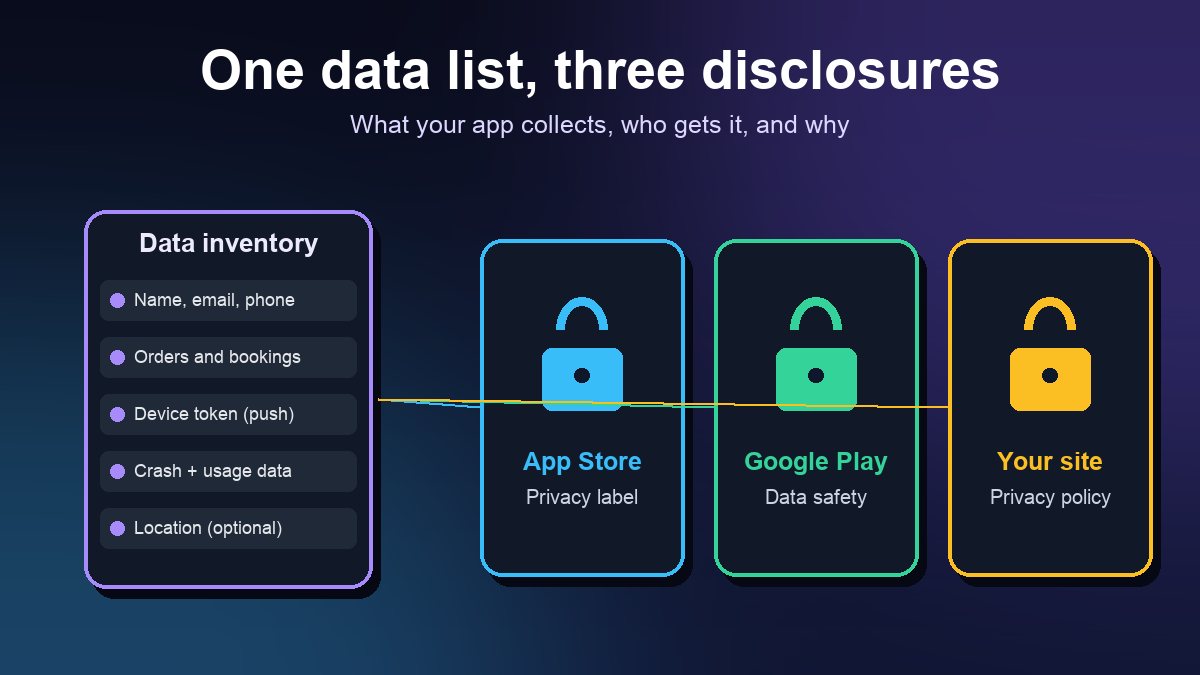
Short answer: Before your app can go live, both stores make you describe what data it collects. Apple calls this the App Privacy section (the "privacy nutrition label") in App Store Connect, and Google calls it the Data safety form in Play Console. Both also require a working privacy policy link, and both count data collected by the tools built into your app, such as analytics, push notifications, crash reporting and ads, not only what you collect yourself. This guide shows a small business how to list that data once and use the same list for both forms and for the privacy policy.
This is a practical guide, not legal advice. If your app handles health, financial or children's data, have a lawyer review your policy and disclosures.
What each store asks for
The two forms look different, but they ask about the same things: which types of data leave the phone, why, and who else gets them.
- Apple App Store. Apple says you must provide information about your app's privacy practices, "including the practices of third-party partners whose code you integrate into your app," and that this is required to submit new apps and app updates. Apple's label groups data by use (for example App Functionality, Analytics, Third-Party Advertising), by whether it is linked to the user, and by whether it is used for tracking.
- Google Play. Google says all developers with an app published on Google Play must complete the Data safety form, including apps on closed, open or production testing tracks. Even an app that collects nothing must complete it and link a privacy policy. Google reviews the form during app review, and if it finds a gap between your app's behavior and your declaration it "may take appropriate action, including enforcement action."
One detail trips up many first-time publishers: Apple defines "collect" as sending data off the device in a way that lets you or a partner access it for longer than it takes to handle the request in real time. If your booking form sends a name and phone number to your server and you keep it, that is collection, even if you never use it for marketing. Apple's guidance is explicit that data collected only for app functionality still has to be declared, just marked with that purpose.
Step 1: Build a data inventory before you open either form
Do this in a simple spreadsheet. One row per data type, with these columns:
- Data type. Name, email, phone number, address, precise or approximate location, photos, contacts, payment info, purchase history, device ID, crash logs, app interactions.
- Where it comes from. A form the user fills in, a permission prompt, or something an SDK gathers automatically.
- Who receives it. Your own backend, your app builder's servers, or a named third party such as an analytics, push or payments provider.
- Why. Running the feature (an order, a booking, a login), analytics, marketing to the user, or advertising.
- Linked to the person? Yes if it is tied to an account, email or phone number.
- Required or optional for the user, and how long you keep it.
For a typical small business app built with a no-code tool, the inventory usually includes more rows than the owner expects:
- Accounts and orders: name, email, phone, delivery address, order history.
- Push notifications: a device token and, depending on the provider, app interaction data.
- Analytics and crash reporting: app interactions, crash data, performance data, often a device or advertising identifier.
- Payments: if checkout runs inside the app, payment details go to your processor; you still disclose them even if you never see the full card number.
- Location: a store finder or delivery radius may use approximate or precise location.
Ask your app builder for its own disclosure list. Reputable builders and SDK providers publish what their code collects, and Google points developers to the Google Play SDK Index for SDK guidance. If your builder cannot tell you what its code sends, treat that as a warning sign before you publish.
Step 2: Fill in Apple's App Privacy section
In App Store Connect, the questions follow the inventory. A few points that decide most answers:
- Optional disclosure is narrow. Apple lets you skip a data type only if it meets every one of its criteria: not used for tracking or advertising, collected only in infrequent, optional cases outside the app's main purpose, and entered by the user in a form where it is clear what is being sent. An optional feedback form can qualify. An order form cannot, because ordering is the point of the app.
- Tracking has a specific meaning. Apple treats linking your app's data with other companies' data for targeted advertising or ad measurement, or sharing it with a data broker, as tracking. If an ad network in your app does that, you must say so, and you must ask permission through Apple's App Tracking Transparency prompt before it happens.
- You can update answers without a new build. Apple notes you can change your responses at any time without submitting an app update. Do it the same day you add a new SDK.
Apple also asks third-party SDKs to ship a privacy manifest (a file named PrivacyInfo.xcprivacy) that records the data they collect and the reasons they use certain system APIs. If your builder compiles the iOS app for you, ask whether the manifests for its SDKs are included; it is a common question in review.
Step 3: Fill in Google Play's Data safety form
The Data safety form lives on the App content page in Play Console. Google's own preparation steps are a good order to work in:
- Add a privacy policy first. Google says it is required to complete the form.
- Check the permissions your app declares and the APIs it uses. A location or contacts permission in the build that you forgot about will contradict a "no location collected" answer.
- Review third-party code. Google says you must reflect data collection or sharing done by libraries and SDKs in your form.
- Answer the security questions, such as whether data is encrypted in transit, and the data deletion questions.
Google separates collected from shared (sent to another company). Sending data to a service provider that processes it on your behalf is treated differently from sharing it for that company's own use, so read the definitions in the form carefully rather than guessing.
Step 4: Write a privacy policy that matches the forms
Apple's App Review Guideline 5.1.1 says every app must link its privacy policy in App Store Connect and inside the app "in an easily accessible manner." The policy must:
- identify what data the app collects, how it collects it, and all uses of that data;
- confirm that third parties receiving user data, such as analytics tools, ad networks and SDKs, give it the same or equal protection;
- explain retention and deletion, and how a user can withdraw consent or request deletion.
Google's App content help adds that the policy, together with in-app disclosures, must comprehensively disclose how the app collects, uses and shares user data, including the types of parties it is shared with.
The practical rule: write the policy from the same inventory you used for the two forms. Reviewers and users compare them, and a policy copied from a generator that mentions data you never collect, or misses an SDK you do use, is how mismatches start. Host it on a public web page that loads without a login, and link it from your settings or account screen. Our app launch checklist covers the other pages to have ready on launch day.
Step 5: Account deletion and consent
If your app lets people create an account, both stores expect a way to delete it:
- Apple: Guideline 5.1.1(v) says that if your app supports account creation, you must also offer account deletion within the app. It also says that if the app does not have significant account-based features, people should be able to use it without a login.
- Google: under Google Play's account deletion requirement, an app that enables account creation must provide an in-app path to delete the account and associated data, and a web link where users can request deletion. That web link appears in the Data deletion area of your store listing.
On consent, Apple asks apps to get the user's permission before collecting user or usage data, to explain each permission prompt clearly, and not to make paid features depend on granting data access. Only request permissions you actually use. A restaurant app with no camera feature should not ask for the camera.
Mistakes that cause rejections and warnings
- "No data collected" while analytics or crash reporting is switched on in the builder.
- A privacy policy link that 404s, redirects to a home page, or sits behind a login.
- Leftover permissions from a template, such as location or contacts, that the app no longer uses.
- Forgetting to update the forms after adding a marketing, chat or ads SDK.
- No account deletion in an app that has sign-up.
- Children's apps without extra care. If your app is aimed at children under 13 in the US, the FTC's COPPA rule adds parental-consent duties, and both stores have additional family policies. Get specific advice before launch.
A 20-minute pre-submission check
- Open the app on a phone and go through every screen. Note every form field, permission prompt and sign-in option.
- Compare that list with your inventory and your builder's disclosure list.
- Open your privacy policy link in a private browser window and confirm it loads and matches the inventory.
- Create a test account, then delete it from inside the app, and confirm the web deletion link works.
- Check that the App Store and Play answers say the same thing about the same data.
If you are still preparing your listing, see our guides to submitting an app to the Apple App Store and publishing on Google Play. For deciding which analytics to keep (and therefore disclose), our guide to app analytics that matter helps you collect less and learn more. And if you are still weighing whether your business needs an app at all, start with why a business might need a mobile app.
Accurate privacy answers do more than get you through review. Customers see them on your store page before they install, and a short, honest label is easier to trust than a long one full of data you do not need.
Sources: Apple Developer, App privacy details on the App Store; Apple, App Review Guidelines (5.1.1 Data Collection and Storage); Apple Developer Documentation, Privacy manifest files; Google Play Console Help, Provide information for Google Play's Data safety section, Prepare your app for review and Understanding Google Play's app account deletion requirements. All pages checked 27 October 2026.
Frequently asked questions
Do I need a privacy policy if my app collects no data?
Yes. Google Play says even apps that collect no user data must complete the Data safety form and link a privacy policy, and Apple's guidelines require a privacy policy link for all apps. The policy can simply state that no user data is collected or shared.
Does data collected by my app builder or its SDKs count?
Yes. Apple asks you to include the practices of third-party partners whose code is in your app, and Google says the Data safety form must reflect collection or sharing done by third-party libraries and SDKs. Ask your app builder for its disclosure list.
Do I have to submit a new app version to change my privacy answers?
Apple says you can update your App Privacy answers in App Store Connect at any time without submitting an app update. On Google Play you update the Data safety form on the App content page in Play Console, and Google reviews the change.